Text alerts
THRIVE! is a fundraising platform where nonprofits and creators share updates with the people who support them. Supporters can choose to get those updates by text message. This page explains how that works.
How you sign up
On a nonprofit's or creator's public THRIVE! page you enter your mobile number and check an unchecked consent box. The Subscribe button stays disabled until the box is checked. Texts only ever go to a number that was signed up this way, and consent is not a condition of giving or of using THRIVE!.
You can see the form on any nonprofit page, for example Long Beach Rescue Mission.
What the sign-up form looks like
This is the form as it appears on a nonprofit's or creator's page (the nonprofit shown is an example). The Subscribe button is greyed out until the box is checked, and nothing is sent to a number that has not been signed up this way.
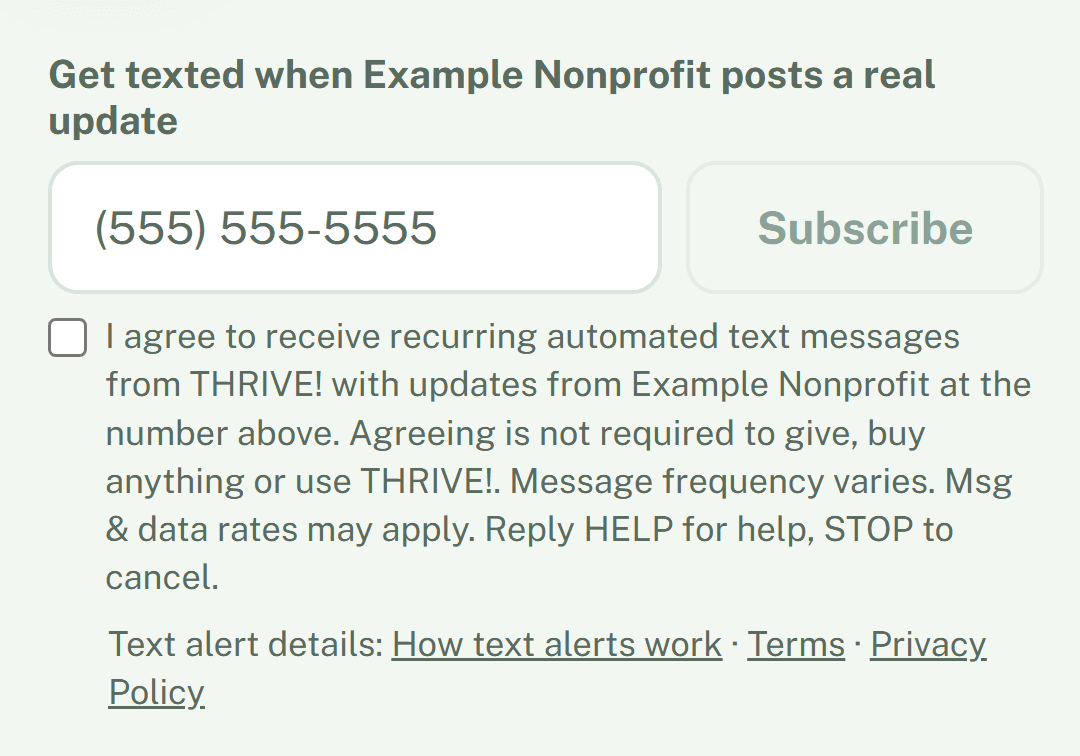
The consent, word for word: “I agree to receive recurring automated text messages from THRIVE! with updates from [the nonprofit or creator you chose] at the number above. Agreeing is not required to give, buy anything or use THRIVE!. Message frequency varies. Msg & data rates may apply. Reply HELP for help, STOP to cancel.”
What we send
- A confirmation right after you sign up: “You're subscribed to text alerts from THRIVE!. Msg & data rates may apply. Reply HELP for help, STOP to cancel.”
- An update from the nonprofit or creator you chose, up to 140 characters, usually with a link to their page, ending with “Reply STOP to unsubscribe.”
- If you text a nonprofit's keyword to our number, one automated reply with a link to that nonprofit's giving page.
Message frequency varies with how often the nonprofit or creator posts an update. Message and data rates may apply. We do not sell or share your mobile number, or your texting consent, with third parties for their marketing. See our Privacy Policy.
How to stop or get help
- Reply STOP (or END, CANCEL, QUIT or UNSUBSCRIBE) to any message to cancel. Reply START to resubscribe.
- Reply HELP for help, or reach us through our contact page.
Who sends the texts
Text alerts are sent by THRIVE!, operated by Thrive Media Group, 2230 Fairview Rd. #10302, Costa Mesa, CA 92626, on behalf of the nonprofit or creator you subscribed to. The full rules are in our Terms of Service (see “Text message alerts”).